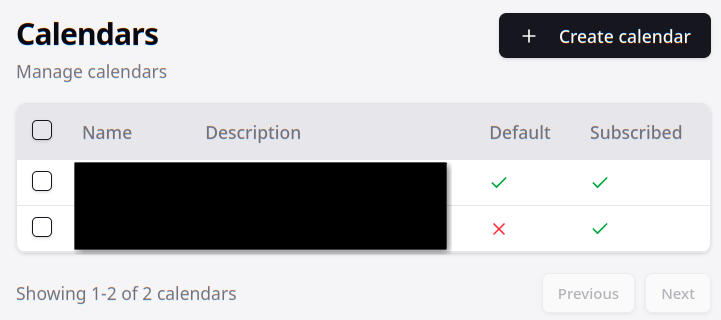
Based on the source, “default” is a real, meaningful property (isDefault in JMAP, exposed in CalDAV as well), not just a marker for auto-created calendars.
-
What “default” means: Stalwart stores a per-account DefaultCalendarId on the account’s principal record. Whichever calendar matches that ID is reported as isDefault: true to clients. It’s used both as the “landing” calendar auto-created on first access (via defaultHrefName/defaultDisplayName settings) and as a genuine marker: if no default is explicitly set, the server falls back to whichever calendar has the lowest ID, so there’s always exactly one calendar flagged as default. Clients (CalDAV/JMAP) can use this flag to decide where new events go by default.
-
No manual toggle in the current WebUI - correct, there’s no switch in the calendar settings page to flip “Default” on. However, it isn’t purely “automatically created only”: the JMAP Calendar/set method supports an onSuccessSetIsDefault argument that lets a client (or stalwart-cli) explicitly designate any existing calendar as the account’s default, independent of which one was auto-created. So “default” can change, it’s just not exposed as a WebUI toggle yet, only via the JMAP API.
Reference: Calendar | Stalwart and Calendar | Stalwart
This is an automated reply from the Stalwart Help Bot. Other community members may follow up if this answer is incomplete or wrong.
It isn’t about how the calendar was created. Each account has exactly one default calendar, and it’s the one incoming invitations are added to; JMAP clients see it through isDefault and normally put new events there. Stalwart creates a calendar automatically the first time an account is accessed without one, and that calendar becomes the default because it’s the first one, which is why the two look linked.
On 2: yes, the web UI only displays it. It’s a read-only property, and you change it from a JMAP client with the onSuccessSetIsDefault argument of Calendar/set. Details are here: Calendar | Stalwart
CalDAV clients get a schedule-default-calendar-URL on the scheduling inbox, which points to the automatically created calendar (defaultHrefName, default unless you changed it). Whether a client uses it to pick where new events go depends on the client.