I just did a fresh install of Stalwart v1, running in Docker with RocksDB as the data store. When I try to create a scheduled task of type “Destroy account and all associated data” from the web admin, the form is rejected with a generic validation error. This is a fresh install, with no migration from a previous version, and I haven’t found anything relevant in the docs or logs.
Expected Behavior
The scheduled task should be created successfully and appear in the task list with the status “Pending task awaiting execution”. At the due date, Stalwart should run it and delete the “test” account together with all its associated data. If any field were invalid, I would expect the form to say which one and why, rather than showing a generic message.
Actual Behavior
When I click Create, the form is rejected with the error “The data did not pass validation”. No indication is given of which field is invalid, and the task is not created.
Reproduction Steps
On a fresh Stalwart v1 installation (Docker, RocksDB), I created a new user with username “test”, selecting the domain already configured in Stalwart. I then created a new scheduled task of type “Destroy account and all associated data”, entering “test” as the Account Name, selecting the same domain, setting the status to “Pending task awaiting execution” and choosing a due date. Clicking Create triggers the error.
Is the Account Name expected to be the plain username, the full email address, or the internal account ID? Are there other required fields for this task type that the UI doesn’t flag clearly? I can provide container logs or a screenshot of the form if that helps. Thanks in advance!
Stalwart Version
v1.x
Installation Method
Docker
Database Backend
RocksDB
Blob Storage
RocksDB
Search Engine
Internal
Directory Backend
Internal
I have reviewed the documentation and FAQ and confirm that my issue is NOT addressed there.
on
I have searched this support forum (open and closed topics) and confirm this is not a duplicate.
on
I understand that topics in this category are triaged by a bot first but a human reply will follow up. If I’d prefer a human-only reply, I’ll add the no-ai tag to my topic.
“Destroy account” isn’t meant to be created by hand. To delete the test account and all of its data, just delete the account itself (Directory › Accounts in the WebUI, or stalwart-cli delete Account --ids <id>). The server then schedules that DestroyAccount task on its own, filled in with the account’s id, name, domain and groups, and the task removes mailboxes, calendars, contacts, files and the rest in the background.
The form fails validation because the task also needs the internal account id, which an account that still exists doesn’t give it, and even with every field filled the server refuses client-created tasks of that type. The error message could be more helpful there, I agree.
If you’re on the Enterprise edition and set archiveDeletedAccountsFor, the task waits until that period ends, and deleting the pending task restores the account: Recovering deleted items | Stalwart
Okay, thanks for the explanation. But I still find some things strange.
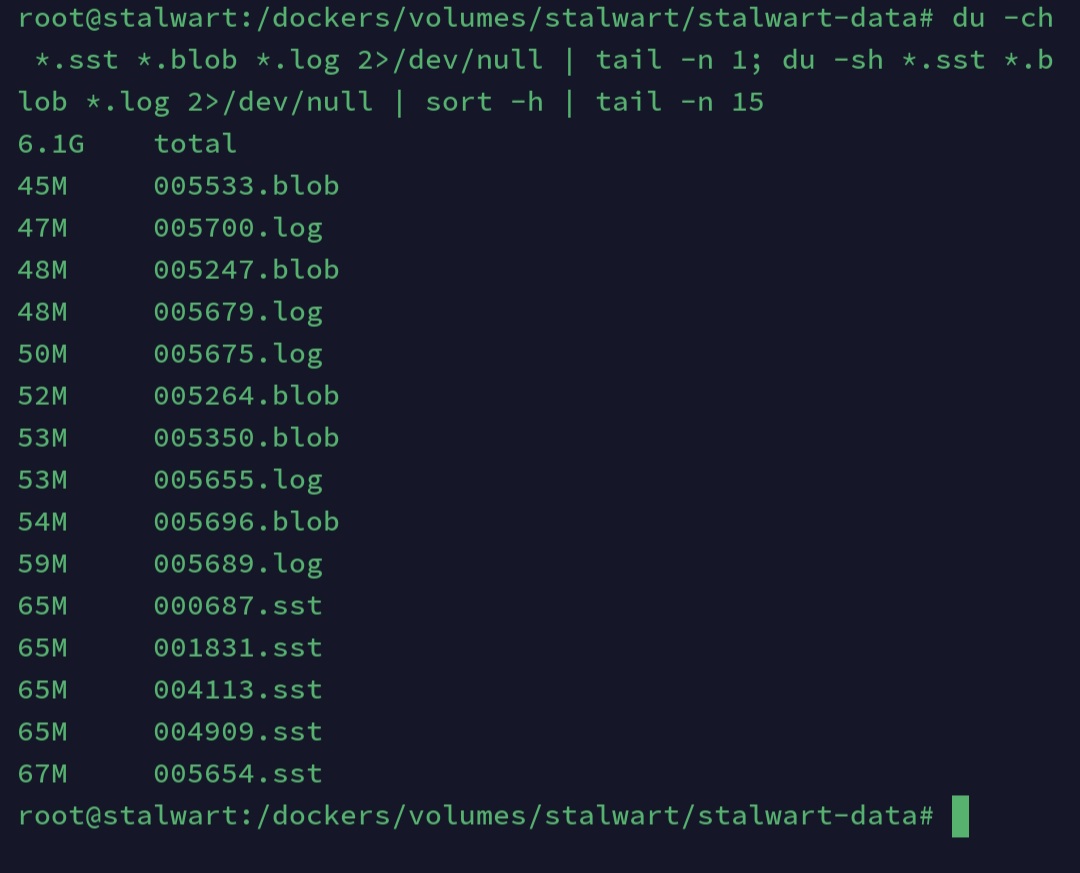
I installed Stalwart v1 from scratch, with a data size of just a few KB. I created a user, copied some emails until the mailbox reached about 8 GB, and then deleted the account. I would have expected that after the data and blob cleanup task, the size of the data directory would go back down to a few KB, but that didn’t happen. It went from 8 GB to 5 GB. What could have gone wrong? I don’t understand!!!
Archiving deleted items only happens on the Enterprise edition when it’s switched on, and when an account is destroyed its archived items are removed along with everything else, so on a fresh install that isn’t where the 3 GB went.
RocksDB doesn’t give space back the moment data is deleted. Deletes are written as markers and the old data stays on disk until compaction rewrites those files. Message blobs live in separate blob files, and Stalwart only compacts them once a large share of the blob data is garbage. So the directory shrinks in steps, and some of what’s left right after a purge is deleted data still waiting for compaction.
To see what the 5 GB is made of, can you post the output of this, run inside the data directory?
I need to correct my last post. @Disrupt’s mention of spam samples was on the mark and I skipped over it.
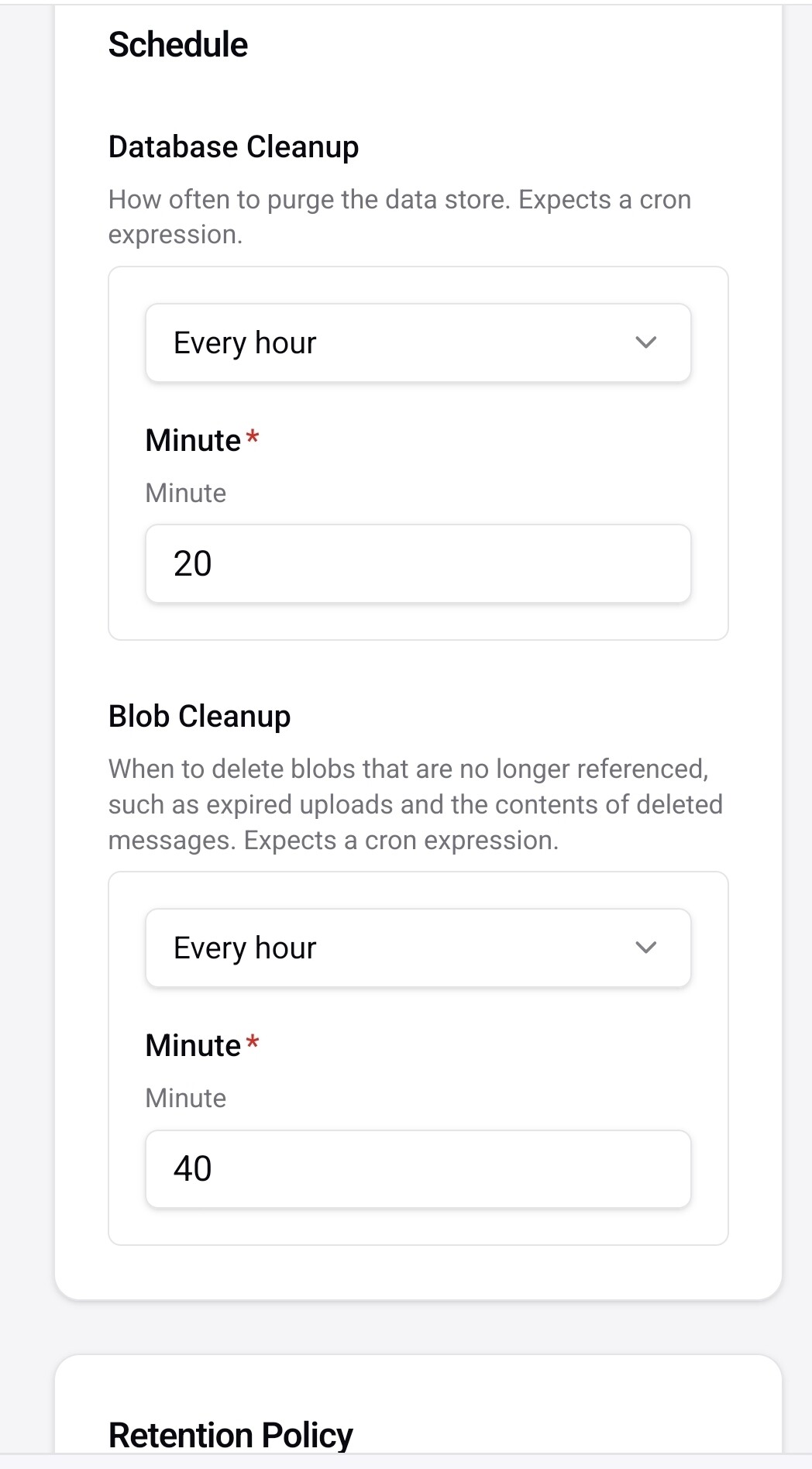
The spam classifier keeps a training sample for every message added to Inbox or Junk over IMAP or JMAP, and each sample holds on to the full message for holdSamplesFor, which is 180 days by default. Deleting an account doesn’t remove its samples. So if you copied that 8 GB in with a mail client, the cleanup tasks see those messages as still in use and leave them alone, however often they run. Your hourly schedule isn’t the problem.
The du I gave you wasn’t much use either, since it adds all three file types into one total. This one tells them apart:
du -ch *.sst | tail -n 1; du -ch *.blob | tail -n 1; du -ch *.log | tail -n 1
To see the samples, run this as an administrator:
stalwart-cli query SpamTrainingSample
If they turn up, you can delete them and run the two purges in order, waiting for the first to finish:
That deletes every sample on the server, which is fine on a test install but also throws away what a future retrain would use. The space comes back with the data purge, and only once a good part of the blob data is garbage, so don’t expect it to reach zero to the byte. How many samples does the query list?
I think we found where your 5 GB went, and it’s a bug on our side. My earlier answer about compaction didn’t cover it.
When mail is copied into Inbox or Junk over IMAP, or imported over JMAP, Stalwart keeps a spam training sample for each message, and each sample holds on to the message body for as long as holdSamplesFor says (180 days by default). Deleting an account removed the mail but never removed those samples, so Blob Cleanup saw the bodies as still in use and left them on disk.
The account deletion task now removes the account’s samples together with everything else. The fix ships in the next weekly Stalwart release.
It won’t clean up the account you already deleted, since that task has already run. You can list what’s left and remove it with the CLI:
After that, the next Blob Cleanup can drop the bodies. The space then comes back in steps as RocksDB compacts, as I mentioned before. If you don’t delete them, they expire on their own once the hold period passes.
I worked this out from the code and our tests, so I haven’t confirmed it on your server. How did you copy the 8 GB in, over IMAP or some other way? If it was IMAP, the query above should list a lot of samples.
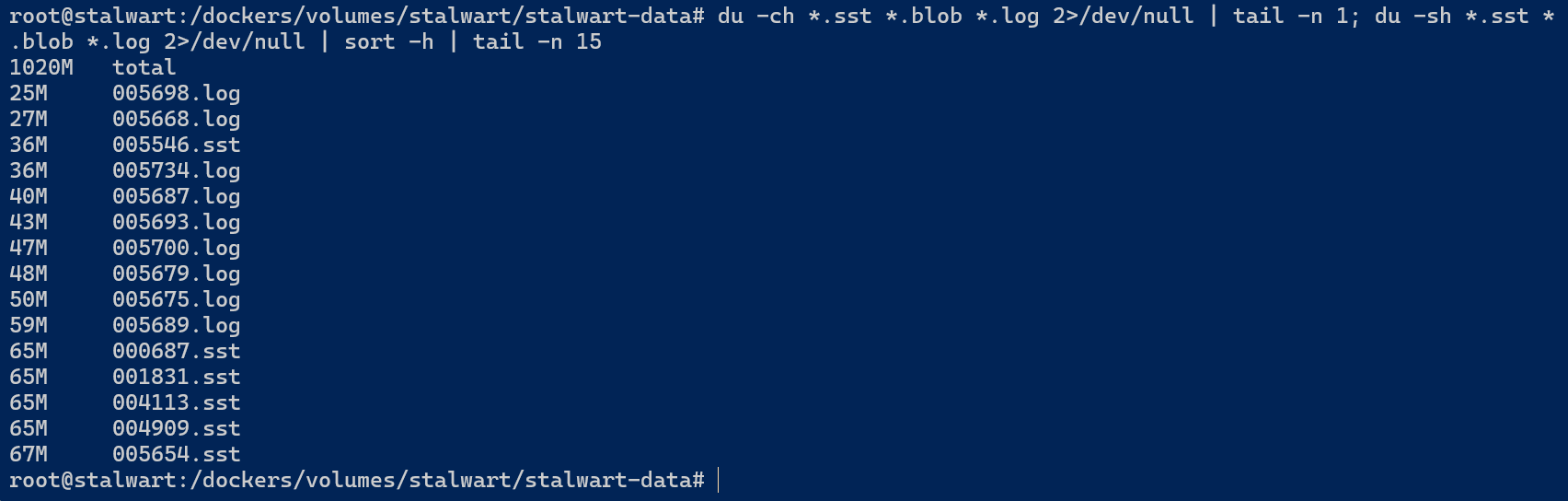
I followed your instructions and was able to free up some space. As of now, the RockDB directory is using 1.1 GB of space.
Anyway, to answer your question, I transferred the emails via IMAP using imapsync.
imapsync copies over IMAP, so that matches: every message it appended to Inbox left a training sample behind, which is what held on to the bodies after the account was gone.
In your listing there isn’t a single .blob file among the largest ones any more, so the message bodies are gone. The 1 GB that’s left is RocksDB’s own files: the .log files are its write-ahead log, which it drops once the in-memory tables they cover have been flushed to disk, and the .sst files still carry some deleted entries until compaction rewrites them. After 8 GB of writes and deletes that’s a normal amount to have lying around, and it should keep going down as the server runs. It won’t get back to the few KB of an empty install, but there’s nothing left on the Stalwart side to clean up.