Issue with TLS certificate; Stalwart emails cannot be retrieved

Issue Description

Hello Stalwart community,

After discussing all the drama surrounding the upgrade from Stalwart 0.15.5 to 0.16.0 on GitHub, I’ve run into a new issue and decided to sign up for the new Stalwart forum.

I run Stalwart Mail as a Docker container on my private home server. A reverse proxy (Caddy), included in the Docker Compose setup, handles the domain for my email as well as HTTPS access to the Stalwart WebGUI. Caddy also generates a TLS certificate for my domain.

I copied the certificate text into the Stalwart WebGUI (specifically here: https://meine-domain.de/admin/Settings/x:Certificate).

This worked without issues until yesterday. However, this morning, my email client (Microsoft Outlook) reported that the email address associated with the Stalwart server no longer had a valid certificate.

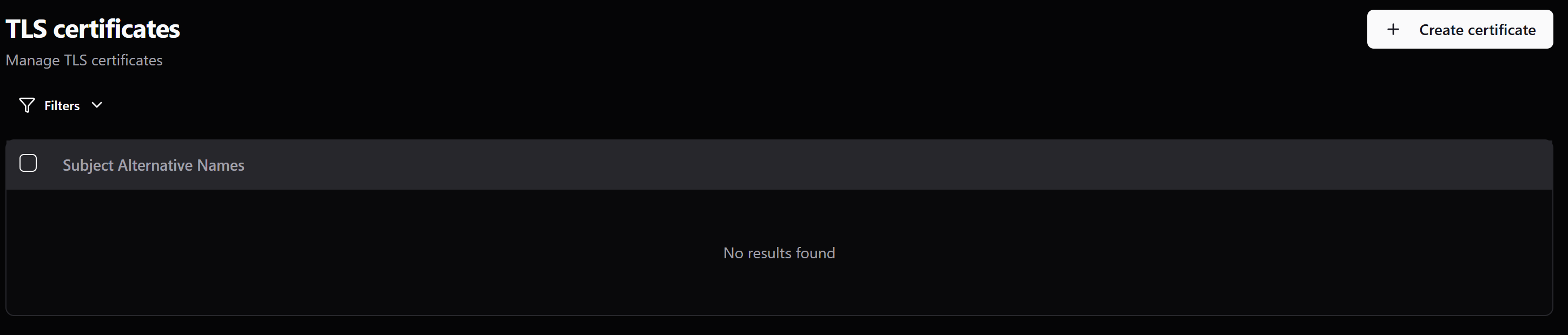
Upon checking the Stalwart WebGUI, I saw that the certificate list was empty; Stalwart had simply deleted the certificate I had manually entered.

I copied the certificate text from Caddy to Stalwart again and noticed Stalwart reporting that the certificate was only valid until yesterday (2026-06-23). However, when I check the certificate in Caddy, I see it is still valid for another 81 days. (My domain URLs also open via HTTPS without any error messages.)

I also noticed something else: whenever I stop and restart the Stalwart Docker Compose container, the certificate disappears from the WebGUI again. This happens every time the container restarts. Why is this happening?

What is causing this certificate issue, and how can I resolve it? Thanks in advance for your help!

Regards,
Mic.

Expected Behavior

Stalwart handles manually entered certificates correctly. Stalwart does not delete certificates arbitrarily. Emails can be retrieved reliably.

Actual Behavior

Stalwart reports an expired TLS certificate. Stalwart deletes the certificate via the WebGUI. Emails can no longer be retrieved.

Reproduction Steps

See above.

Relevant Log Output

none

Stalwart Version

v0.16.x

Installation Method

Docker

Database Backend

RocksDB

Blob Storage

RocksDB

Search Engine

Internal

Directory Backend

Internal

I have reviewed the documentation and FAQ and confirm that my issue is NOT addressed there.

on

I have searched this support forum (open and closed topics) and confirm this is not a duplicate.

on

I understand that topics in this category are triaged by a bot first but a human reply will follow up. If I’d prefer a human-only reply, I’ll add the no-ai tag to my topic.

on
Let me research both issues: the certificate disappearing on restart, and the certificate expiry mismatch.

There are two separate problems here, and both have clear explanations.


Problem 1: Certificate disappears on container restart

This is a data persistence issue. Stalwart stores all objects – including certificates – in its database (RocksDB in your case), which lives in the /var/lib/stalwart volume. If that volume is not properly persisted between restarts (e.g., it’s an anonymous/ephemeral volume in your Docker Compose file, or the container is being recreated rather than just restarted), the database is wiped on every restart and everything you configured through the WebUI vanishes.

Fix: Make sure your Docker Compose setup mounts a named or bind-mounted volume for /var/lib/stalwart. The docs show this pattern:

docker volume create stalwart-data

docker run ... \
  -v stalwart-etc:/etc/stalwart \
  -v stalwart-data:/var/lib/stalwart \
  stalwartlabs/stalwart:v0.16

Or in Docker Compose:

volumes:
  - stalwart-data:/var/lib/stalwart

If you are using docker compose down (instead of docker compose restart stalwart), note that down destroys containers and potentially anonymous volumes. Use restart or stop/start instead to preserve named volumes. If using bind mounts, the host directory must be owned by UID 2000.


Problem 2: Certificate shows as expired, but Caddy shows it as valid

This is likely because Caddy has already renewed the certificate, but the copy you pasted into Stalwart was the old one that expired yesterday. Caddy automatically renews certificates and stores the new version internally – you need to copy the current, renewed PEM from Caddy’s certificate store and paste it (along with the private key) into Stalwart again.

Once persistence is fixed (Problem 1), this manual copy only needs to happen each time Caddy renews. A better long-term approach would be to configure Stalwart’s certificate and privateKey fields to reference file paths pointing to Caddy’s certificate files on disk (using @type: File and filePath), so Stalwart always reads the current cert from the filesystem without you having to re-paste it after each renewal. See the TLS Certificates docs for the file-reference syntax.

Docs referenced:

This is an automated reply from the Stalwart Help Bot. Other community members may follow up if this answer is incomplete or wrong.

WebGUI page:

I have a similar setup (using rootless Podman Quadlet and Caddy). I followed the instructions here for certificate management and it works without problems. Did you follow the instructions there, copying the certificate (the file!) and so on?

Hello @gsaelzbrot,

Thanks for the feedback. My setup is slightly different from yours. I haven’t configured a specific cert file in Stalwart; instead, I actually copy the contents of the certificate files.

This approach never caused issues with Stalwart 0.15.x, and it worked fine with Stalwart 0.16.x up until yesterday. I’ve restarted the container frequently using Docker “down” and “up”—probably once a week—and I’ve never lost a certificate. That’s why I don’t understand why Stalwart is suddenly behaving differently.

The only theory I had was that Stalwart deletes the certificate (which it considers outdated) during a Docker restart. However, the AI ​​agent in this forum seems to have a different opinion (which might be incorrect).

Regards,
Mic.

Hi everyone,

I’ve managed to solve the problem. It turned out to be an issue with Caddy. For some reason, Caddy had switched from ACME to ZeroTLS for a new certificate, and the resulting certificate files were being stored in a different path. Consequently, I had been inadvertently reading and copying the expired certificate to Stalwart-Mail over and over again.

However, by adding a temporary entry to the Caddyfile, I was able to force Caddy to store a new ACME certificate in the usual location.

Caddyfile:
[...]
your-domain.de:443 {
  tls [email protected] {
    protocols tls1.3
    # === force new ACME certificate ===
    ca https://acme-v02.api.letsencrypt.org/directory
  }
[...]

Once I copied this valid certificate to Stalwart-Mail, it was no longer automatically deleted when the container restarted. I do find this behavior in Stalwart-Mail problematic, though. I don’t recall encountering this kind of behavior with version v0.15.x. I would prefer it if Stalwart-Mail notified me that a certificate had expired instead of simply deleting it. Is there any way to improve this?

Thanks a lot for your help!

Regards,
Mic.