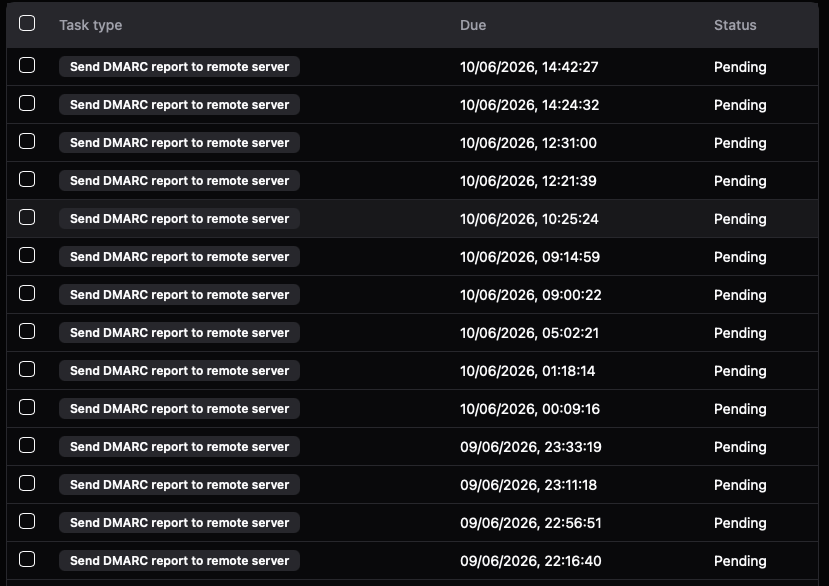
Stalwart creates DMARC and TLS reports but only creates pending Tasks for delivery in the Task-Queue. They are never send out.
Expected Behavior
Reports are send out to other mail servers and tasks are finished.
Actual Behavior
Report tasks stay in task list pending.
Reproduction Steps
Receive an email and let stalwart create a report.
See pending tasks for Report delivery in task list
Stalwart Version
v0.16.x
Installation Method
Docker
Database Backend
FoundationDB
Blob Storage
S3-compatible
Search Engine
Internal
Directory Backend
Internal
Additional Context
The email server is functional and I can send and receive emails without any problem.
I have reviewed the documentation and FAQ and confirm that my issue is NOT addressed there.
on
I have searched this support forum (open and closed topics) and confirm this is not a duplicate.
on
I understand that topics in this category are triaged by a bot first but a human reply will follow up. If I’d prefer a human-only reply, I’ll add the no-ai tag to my topic.
Let me research this issue with outbound DMARC/TLS reports staying pending in the task queue.
Based on the documentation, the behavior you are seeing is likely by design but worth understanding - and a few specific causes are worth checking.
DMARC and TLS aggregate report tasks stay “pending” until their aggregation window closes. By default the aggregateSendFrequency is daily, meaning Stalwart accumulates data for a full day before the task fires and actually delivers the report. So seeing tasks sit in the queue for hours is normal. If the window has clearly passed and tasks still have not moved, there are a few things to investigate:
Aggregation window not elapsed yet. Confirm the aggregateSendFrequency setting (WebUI under Settings > MTA > Reports > DMARC and Settings > MTA > Reports > TLS). If it is daily, tasks will remain pending for up to 24 hours from when the first matching message was processed.
Report delivery itself is failing silently. When the window closes, Stalwart generates the report and queues it for delivery like any other outbound email. Check Management > Emails > Queued (the QueuedMessage objects) for any report messages that are stuck or repeatedly failing. Look at the per-recipient RecipientStatus for TemporaryFailure or PermanentFailure entries with a DeliveryErrorType (DNS error, connection error, TLS error, etc.).
DKIM signing domain misconfiguration. Reports are signed with the domain in aggregateDkimSignDomain (default: system('domain')). If a valid DKIM key for that domain is not configured, the report message may fail to form or deliver.
Log events to check. Enable or review the outgoing-report.* and queue.* log events (documented in the Events reference) to see exactly what is happening when the window closes - whether the task fires, whether a message is queued, and whether delivery is attempted.
The “due” column is when they will fire out, 24 hours after first receiving/sending the first message to that specific domain. They’re meant to be a daily digest.
You are right, the mails in the screenshot were actually “in time”. There were a few other ones though which should have been sent out this morning.
In any case, it seems to be working again. I manually added a report sender domain and removed it again (so it goes back to the default one) with save and reload in between.