How to configure a global authenticated outbound relay (smarthost) in Stalwart 0.16.12?

Issue Description

Need help configuring a global authenticated outbound relay (smarthost) in Stalwart 0.16.12. I configured the Relay Route and the Outbound Strategy according to my understanding of the official documentation, but outbound SMTP still connects directly to recipient MX servers.
How to configure a global authenticated outbound relay (smarthost) in Stalwart 0.16.12?I am trying to configure a global authenticated outbound relay (smarthost) in Stalwart 0.16.12.

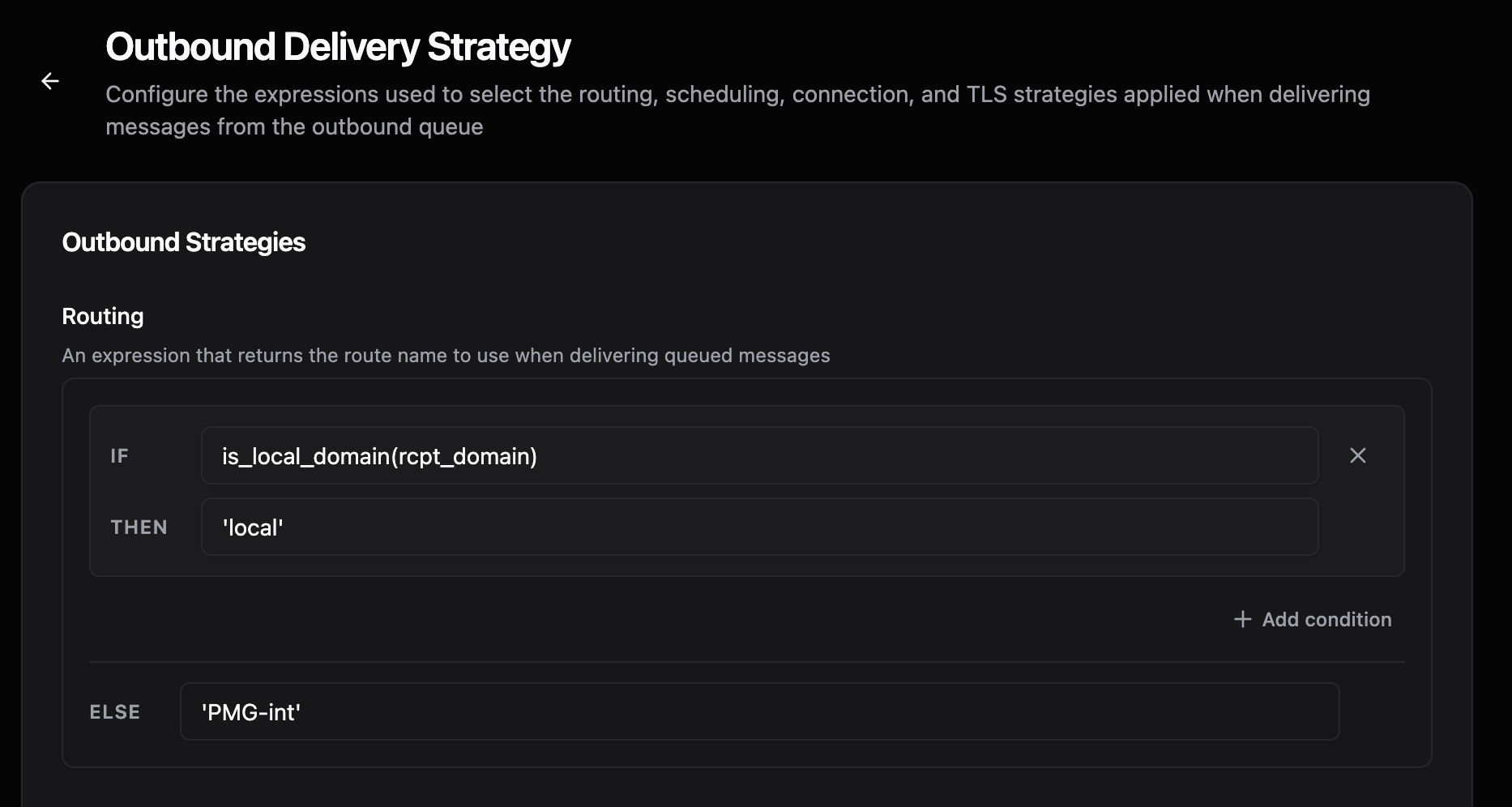
I created a Relay Route with SMTP authentication and configured the Outbound Strategy so that all non-local recipients use that route.

The relay is reachable and TLS connectivity has been verified.

However, when sending to external recipients, Stalwart still connects directly to the recipient MX server instead of using the configured relay.

The Web UI and CLI both show the relay configuration correctly.

Am I missing an additional configuration step, or should the Relay Route be sufficient for this use case?

Expected Behavior

Every outbound message destined for a non-local domain should be sent through the configured authenticated SMTP relay (smtps.aruba.it:465) instead of being delivered directly to the recipient MX server.

Actual Behavior

The configured Relay Route is ignored.

Instead of connecting to the configured relay host (smtps.aruba.it:465), Stalwart opens a direct SMTP connection to the recipient MX server (for example gmail-smtp-in.l.google.com).

Delivery Trace and packet capture both confirm that the configured relay is never used.

Reproduction Steps

  1. Install Stalwart Mail Server 0.16.12 on Debian.

  2. Create a Relay Route pointing to smtps.aruba.it:465 with SMTP authentication enabled.

  3. Configure MtaOutboundStrategy:

    IF is_local_domain(rcpt_domain)
    local
    ELSE
    aruba

  4. Send an email to an external recipient (for example Gmail).

  5. Observe the SMTP connection.

  6. Stalwart connects directly to the recipient MX instead of the configured relay.

Stalwart Version

v0.16.x

Installation Method

Binary (Linux)

Database Backend

RocksDB

Blob Storage

RocksDB

Search Engine

PostgreSQL

Directory Backend

Internal

I have reviewed the documentation and FAQ and confirm that my issue is NOT addressed there.

on

I have searched this support forum (open and closed topics) and confirm this is not a duplicate.

on

I understand that topics in this category are triaged by a bot first but a human reply will follow up. If I’d prefer a human-only reply, I’ll add the no-ai tag to my topic.

on
The most common causes of a “Relay Route” being silently ignored are mismatches in how the route expression selects it, so the fix is almost always in the route expression syntax on MtaOutboundStrategy, not in the relay itself.

How it should be wired together

  1. Define your relay as an MtaRoute with @type: "Relay" and a name (for example "aruba"):
{
  "@type": "Relay",
  "name": "aruba",
  "address": "smtps.aruba.it",
  "port": 465,
  "protocol": "smtp",
  "implicitTls": true,
  "authUsername": "[email protected]",
  "authSecret": {"@type": "Value", "secret": "yourpassword"}
}
  1. On the MtaOutboundStrategy singleton, the route field must be a proper expression object, and string results (both route names and the local check) must be single-quoted inside the JSON string, e.g.:
{
  "route": {
    "match": [
      {"if": "is_local_domain(rcpt_domain)", "then": "'local'"}
    ],
    "else": "'aruba'"
  }
}

The pseudo-code you posted (IF ... local ELSE aruba) is not valid — if the then/else values aren’t quoted string literals like 'aruba', the expression will fail to resolve to a route name and Stalwart falls back to its built-in default ('mx'), which is exactly the direct-to-MX behaviour you’re seeing.

  1. The name returned by the route expression ('aruba' in this example) must exactly match the name field of your Relay MtaRoute. If there’s any mismatch (typo, case difference), delivery fails to resolve the named route — check whether your setup actually falls back to mx due to a name mismatch as well.

You can verify what’s actually being evaluated with:

stalwart-cli get MtaOutboundStrategy
stalwart-cli get MtaRoute

and confirm the route name returned by the expression matches one of the returned MtaRoute names.

Reference: MTA Outbound Routing and MtaOutboundStrategy.

This is an automated reply from the Stalwart Help Bot. Other community members may follow up if this answer is incomplete or wrong.

Hello,

Thank you for your reply.

I have already verified those points.

The Relay Route exists and its name is exactly:


aruba

The current outbound strategy returned by stalwart-cli is:


Routing

Condition:
is_local_domain(rcpt_domain)
→ 'local'

Default:
'aruba'

The exported configuration also contains:


"else":"'aruba'"

so the route expression appears to evaluate to the correct string literal.

The Relay Route name and the returned value match exactly.

Despite this, outbound SMTP still connects directly to the recipient MX server instead of the configured relay.

Could you please confirm whether there is any additional configuration required in 0.16.12 for a Relay Route to be used as a global smarthost?

I can also provide the exported configuration if that would help.

I needed similar, and mine is setup as and working properly

Thanks. Our routing strategy appears to be identical.
Would you mind sharing the configuration of your PMG-int relay route (or a screenshot of the Relay Route settings)?
I’m trying to identify whether there is an additional parameter in the relay definition that enables global smarthost delivery.

Hello,

I have completed an extensive CLI verification of my configuration and I believe this is no longer a configuration issue.

Environment:

  • Stalwart Mail Server 0.16.12
  • Debian 12
  • Community Edition

Goal

Use an authenticated SMTP relay (smtps.aruba.it:465) as the global outbound smarthost.

Configuration

Relay Route


Type: Relay

Name: aruba
Address: smtps.aruba.it
Port: 465
Protocol: SMTP
Implicit TLS: Yes
SMTP AUTH: configured

CLI output:


$ stalwart-cli get MtaRoute <route-id>

Type: Relay Host

Address: smtps.aruba.it
Port: 465
Protocol: SMTP

TLS
  Implicit TLS: Yes

Authentication
  Username: <configured>

Outbound Strategy

CLI output:


$ stalwart-cli get MtaOutboundStrategy

Routing

Condition:
is_local_domain(rcpt_domain)
    -> 'local'

Default Value:
    'aruba'

Connection Strategy


$ stalwart-cli get MtaConnectionStrategy

Connection Strategy
Name: default

EHLO Hostname: <none>

Source IPs:
    <empty>

No custom connection strategy is configured.


Observed behaviour

Despite the configuration above, outbound SMTP never uses the configured Relay Route.

Instead, Stalwart performs direct MX delivery.

Example:


gmail-smtp-in.l.google.com

Gmail reports that the SMTP connection originates from my public server IP instead of the configured relay.

Example rejection:


550 5.7.26

SPF = did not pass
DKIM = did not pass

IP = <my public IP>

This proves that the message is delivered directly rather than through smtps.aruba.it.


What has already been verified

  • Relay Route exists.
  • Route type is Relay.
  • Relay host configuration is correct.
  • SMTP AUTH configured.
  • Implicit TLS enabled.
  • Outbound Routing Strategy returns aruba.
  • Connection Strategy is the default one.
  • No queued messages remain after delivery attempts.
  • Network connectivity to Aruba is OK.

Question

According to the documentation, returning the Relay Route name from MtaOutboundStrategy.route should cause delivery through that relay.

However, in 0.16.12 the relay is completely ignored and direct MX delivery is always performed.

Is there:

  • an additional object that must reference the Relay Route,
  • a known limitation of the Community Edition,
  • or is this a regression/bug in 0.16.12?

If this is expected behaviour, could you please indicate which additional configuration object is required?

Thank you.

The routing expression’s result has to match a Relay Route object’s name exactly, and if it doesn’t resolve, delivery silently falls back to direct MX, which is what you’re seeing. So the string is evaluating fine but isn’t matching a registered relay route.

Quickest way to confirm: check the server log around one of those direct-MX deliveries for an “Id not found” / gateway-not-found event carrying Id = aruba just before it connects to the MX. If that’s there, the name isn’t resolving. Then verify with stalwart-cli query MtaRoute that there’s actually a route of type Relay named aruba (host smtps.aruba.it, port 465, TLS implicit on 465, and the SMTP auth username/secret set), and that the outbound strategy you edited is the active singleton rather than a second copy. A relay route that got created as the wrong type, or a strategy edit that didn’t land on the live object, both produce exactly this.

If the log shows the route resolving but it still goes direct, post the exported MtaRoute and MtaOutboundStrategy and I’ll look.

Thanks. I verified all of those points through the CLI. MtaRoute: - Name: aruba - Type: Relay - Address: smtps.aruba.it - Port: 465 - Protocol: SMTP - Implicit TLS: Yes - SMTP AUTH configured CLI output confirms: Type: Relay Host Route Details Name: aruba MtaOutboundStrategy (singleton): Routing Condition: is_local_domain(rcpt_domain) → ‘local’ Default Value: ‘aruba’ So the routing expression resolves to exactly the existing Relay Route name. The relay object exists and is of type Relay. Unfortunately Community Edition does not provide Trace objects, and nothing is written to systemd journal, so I cannot verify whether an “ID not found” or “gateway-not-found” event is emitted. Is there another way to enable routing diagnostics in Community Edition? Because from the CLI everything appears consistent, yet delivery still connects directly to the destinatio

This may be a super dumb question along the lines of “ensure all cables are securely connected”, but do those config changes require a config reload/restart?

Was a cause or solution found? I appear to be suffering the same issue with smtp2go as a mail relay.

Setup:
New route - relay host, mail.smtp2go.com, port 587, implicit TLS on, username and password entered. Route named s2g

Changed strategy from ‘mx’ to ‘s2g’

Reloaded server settings. Cannot send emails, they simply queue up. There appears to be no connection to smtp2go.

edit: I put these settings into my mail client as the outgoing server, had to change SSL/TLS to StartTLS, but it connected successfully and sent the first message through my smtp2go account.

Obviously, it’s preferable to have Stalwart handle this for all users, rather than configure it on every user device.

edit2: works on smtp2go port 587(TLS enabled) only with implicitTLS disabled

Going direct to the MX means the route name isn’t resolving in the running config. When the outbound strategy returns a route name that Stalwart can’t find, it silently falls back to direct MX delivery (a failed relay connection would defer or bounce instead, so the fact that it reaches Gmail directly tells me the “aruba” name isn’t being matched). The most common cause is simply that the config wasn’t reloaded after you added the route and strategy, so try a reload or restart and re-test. If you raise the log level you’ll see a “Gateway not found” event on a name miss, which confirms it.

Your is_local_domain(rcpt_domain) with a single argument is correct, by the way, so that isn’t the issue (a couple of the docs examples show a two-argument form, which I need to clean up).

For piexy’s smtp2go case, that’s a different and simpler problem: port 587 is STARTTLS, not implicit TLS, so implicitTls must be off there. Implicit TLS is for port 465. Once you disable it on 587 that route should connect. The route object fields are documented at Routing | Stalwart.