Impersonation doesn't work with OIDC on /account

Issue Description

When using an external OIDC as directory, it seems we can’t use impersonation on the /account web-ui

Expected Behavior

Using target@domain%admin@domain on the /account login form should redirect me to my OIDC auth page, where I can login as admin@domain, and then I should be logged as target@domain

Actual Behavior

Using target@domain%admin@domain on the /account login form, I’m correctly redirected to my OIDC auth page, where I login as admin@domain. Then I’m redirected back on the /account web-ui, but logged in as admin@domain instead of target@domain

Reproduction Steps

  1. Configure an external OIDC as directory
  2. Try to login on /account using impersonation format target%admin
  3. Once authenticated on the external OIDC, you’re back on the /account Web UI, but as admin instead of target

Stalwart Version

v0.16.x

Installation Method

Docker

Database Backend

PostgreSQL

Blob Storage

PostgreSQL

Search Engine

PostgreSQL

Directory Backend

OIDC

I have reviewed the documentation and FAQ and confirm that my issue is NOT addressed there.

on

I have searched this support forum (open and closed topics) and confirm this is not a duplicate.

on

I understand that topics in this category are triaged by a bot first but a human reply will follow up. If I’d prefer a human-only reply, I’ll add the no-ai tag to my topic.

on
Impersonation is not supported in OIDC, you have to use the recovery admin for impersonating unfortunately.

Apart from being inconvenient, it’s not working either. When using the recovery admin (so target@domain%stalwart) on the login form of /account, it’s redirecting me to my OIDC login page instead of prompting for the recovery password. It’s working correctly if using only the recovery admin login (“stalwart” in my case), I’m correctly prompted for the recovery password. But not when using a impersonation target@domain%stalwart as login

The impersonation with the recovery admin has been fixed in v0.16.19 (yet to be released).

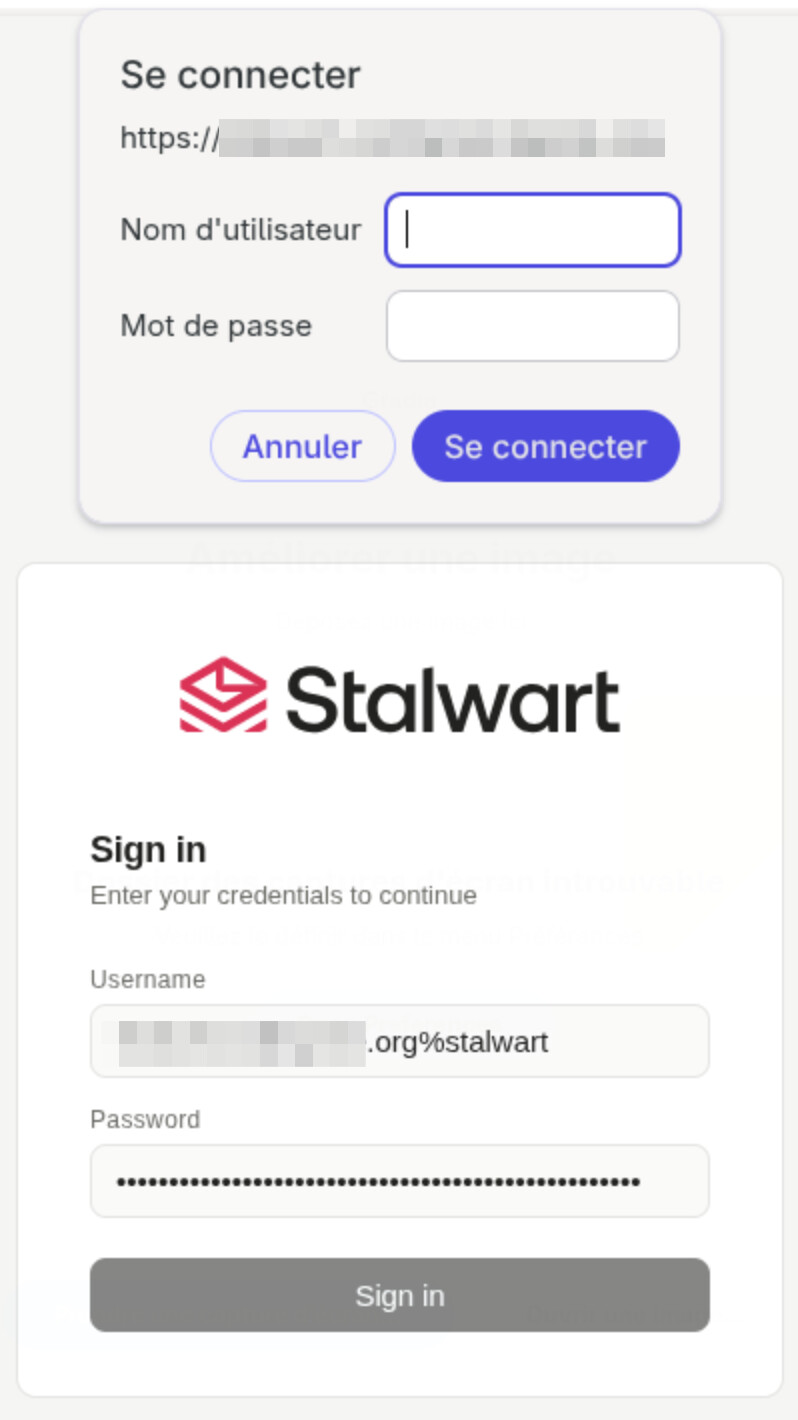
It’s somehow better, but still not working. With 0.16.19, when I enter target@domain%admin I’m now correctly prompted for the recovery password. But, when entering the recovery password, instead of being logged in as target@domain, I’m prompted for a basic auth

The credential popup comes from us, not from your browser being confused. Every 401 the server returns on /api carries a WWW-Authenticate: Basic header, so Firefox intercepts the response and opens its own prompt before the WebUI gets a chance to display the error. I’m changing the /api and /auth endpoints so they stop advertising Basic and you see the real message instead.

That only changes what you see. The 401 behind it means the login was rejected, and the screenshot doesn’t tell me why.

Has the target account ever logged in? With OIDC an account only exists in Stalwart after its first successful login. All we do with the provider is validate tokens; we never look users up there, so impersonating an account that has never logged in cannot work. If that is what happened, log in as the target once, then try target@domain%stalwart again.

If it had already logged in, then something else is failing and I need the server log for that request. The auth failure is logged with a Reason field; that string tells me which check rejected it.

That’s the whole problem : I’m trying to setup a service account, which can’t login through OIDC. I created it, but never logged in yet. I was hopping to use impersonation to create app password

Indeed, I can confirm impersonation works for an account which has logged once through OIDC, but not for the ones created, but never logged in. But we’re in a checken-egg problem here : the account needs to login once to use impersonation, but I need to use impersonation to create an app password the account can login …

Impersonating an account that has never logged in cannot work under OIDC, and that one is structural. The 0.16.20 fix resolves an unknown target by asking the directory for the recipient, and OIDC directories have no recipient lookup to ask. LDAP and SQL get covered by it; OIDC has nothing to fall back to.

Create the account yourself first and the problem goes away. An OIDC-backed domain does not stop you creating a local account through the WebUI or apply: what gets refused on an external-directory account is a password credential, not the account. That is the documented path for OIDC anyway, since an account has to exist locally before it can receive mail at all: OpenID Connect | Stalwart.

With service@domain present, service@domain%stalwart resolves it directly and the /account portal in that session will issue the app password. The permission strip you would expect to block it keys off the token’s own account id, which is the target’s there, not the recovery admin’s. That app password is then checked against the local account before the OIDC directory is consulted, so IMAP, SMTP and JMAP all work with it and the service account never touches your IdP; an OIDC login elsewhere will not clear it either. For API-only automation an API key is the better fit.

Also, the account manager page is wrong here and I expect it is what sent you down this route: it says application passwords cannot be self-managed with an external directory. That holds for LDAP, not for OIDC. I will get it corrected.

I have already created the acounts manually. But yet, can’t impersonate using the recovery admin user. I though it was because the user never logged in, but no (same error for users which logs in through OIDC once). I do have a target user for which it is working though, I need to check what difference it has. For any other user, when I try to impersonate using target@domain%stalwart

  • When trying to login on /account, I get Temporary server failure. If the problem persists, contact your administrator.
  • The call to /api/auth returns with a 401, and the following payload
{
    "type": "about:blank",
    "status": 401,
    "title": "Unauthorized",
    "detail": "You have to authenticate first."
}
  • In stalwart logs, I have
2026-09-04T10:27:51Z DEBUG HTTP request URL (http.request-url) listenerId = "http-recovery", localPort = 8877, remoteIp = 127.0.0.1, remotePort = 60858, remoteIp = 192.168.7.106, url = "/api/auth" 
2026-09-04T10:27:51Z DEBUG Cache hit (store.cache-hit) key = "acme.org", collection = "domainName" 
2026-09-04T10:27:51Z DEBUG Cache hit (store.cache-hit) key = 4, collection = "domainId" 
2026-09-04T10:27:51Z DEBUG Cache hit (store.cache-hit) key = "target", domain = 4, collection = "email" 
2026-09-04T10:27:51Z INFO Authentication successful (auth.success) listenerId = "http-recovery", localPort = 8877, remoteIp = 127.0.0.1, remotePort = 60858, accountName = "[email protected]", accountId = 371, details = "stalwart" 
2026-09-04T10:27:51Z DEBUG Cache hit (store.cache-hit) key = 371, collection = "accessToken" 
2026-09-04T10:27:51Z ERROR Authentication error (auth.error) listenerId = "http-recovery", localPort = 8877, remoteIp = 127.0.0.1, remotePort = 60858, details = "Invalid client registration.

The user [email protected] was created manually in stalwart

That log provided some useful info. Authentication is succeedingv the auth.success line is real, the target account resolved fine, and the account existing or not was never the issue. What fails is the check immediately after it, which validates the OAuth client the WebUI presents.

You have requireClientRegistration enabled on the OIDC provider, and stalwart-webui (the WebUI’s built-in client id) is not registered, so that check rejects the session. It has an escape hatch, the oauth-client-override permission, but it is tested against the account being impersonated, not against the recovery admin. That permission belongs to the System Administrator role only. Compare the roles on your one working target against a failing one; I expect that is the entire difference.

So either set requireClientRegistration back to false, or register the WebUI as a client: an OAuthClient with clientId stalwart-webui, no secret (it is a public client), and redirectUris listing <origin>/admin/oauth/callback and <origin>/account/oauth/callback. Those are matched as exact strings, and your origin is the recovery listener on port 8877, so it has to be the URL your browser shows. This case is written up at Dynamic Registration | Stalwart under the WebUI client heading.

The Basic auth prompt I described in post #6 is gone as of 0.16.20, which is why you now get the JSON error instead. I was also wrong about the app-password restriction: that text is on a docs page, not the account manager, and it is wrong for LDAP as well as OIDC, since app passwords are checked locally before the directory is consulted. I will get it corrected.

Thanks for your help. I did registered a stalwart-webui client, but only added the callbacks for the main web access vhost. The recovery stalwart instance is exposed through a dedicated vhost. After adding the two callbacks (/account/oauth/callback and /admin/oauth/callback) also for the recovery vhost, impersonation is working !