Issue Description
I am trying to implement custom logging within a system Sieve script for debugging purposes, but I am encountering a compilation error. Could you please guide me on whether there is a supported way to write logs directly from a Sieve script?
Expected Behavior
- The script compiles and saves successfully.
- When the script executes, the custom string (DEBUG here.) appears in the system log / Observability tab.
Actual Behavior
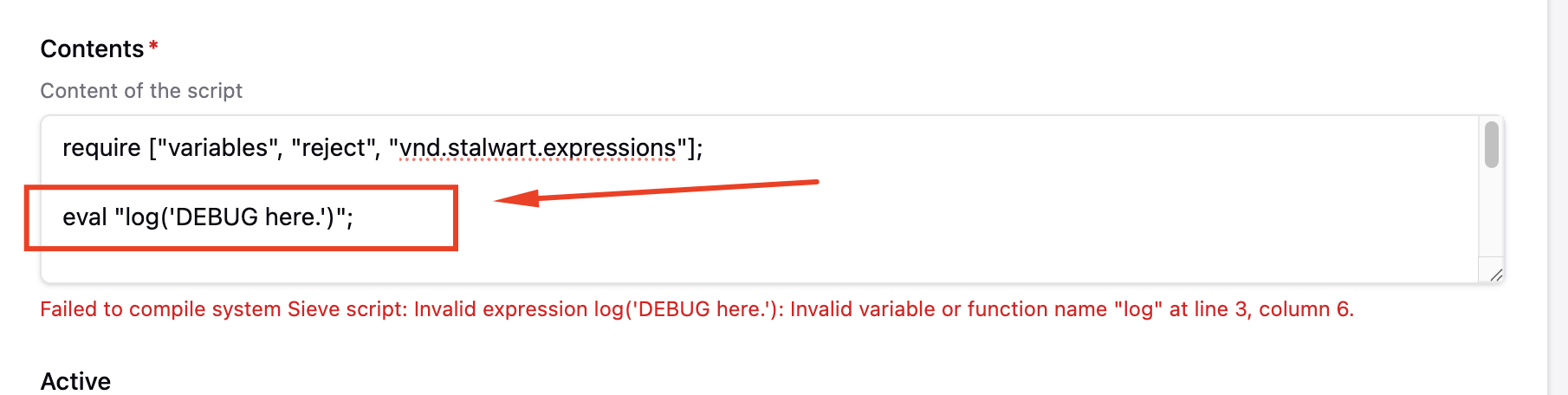
“Failed to compile system Sieve script: Invalid expression log(‘DEBUG here.’): Invalid variable or function name “log” at line 3, column 6.”
Reproduction Steps
- Navigate to WebUI > Settings > Sieve > System Script.
- Click Add new (or edit an existing script).
- In the Contents section, add the following expression using vnd.stalwart.expressions:
Code snippet
require [“variables”, “reject”, “vnd.stalwart.expressions”];
eval “log(‘DEBUG here.’)”;
- Click Save.
Stalwart Version
v0.16.x
Installation Method
Binary (Linux)
Database Backend
RocksDB
Blob Storage
RocksDB
Search Engine
Internal
Directory Backend
Internal
I have reviewed the documentation and FAQ and confirm that my issue is NOT addressed there.
on
I have searched this support forum (open and closed topics) and confirm this is not a duplicate.
on
I understand that topics in this category are triaged by a bot first but a human reply will follow up. If I’d prefer a human-only reply, I’ll add the no-ai tag to my topic.
on
Let me look into what logging functions are available in Stalwart’s Sieve/expression environment.
The complete reference for Sieve expression functions does not include a log function. There is no built-in log() function in the vnd.stalwart.expressions extension, which is why you get the “Invalid variable or function name” error. However, there is a practical workaround for debugging purposes.
The Sieve notify or fileinto actions are not what you want for pure logging. Instead, the most viable approach from within a trusted Sieve script (a system script) is to use the exec function to call an external script that logs to a file, or to use add_header to emit a debug header visible in the message, or to leverage key_set to write to an in-memory store you can inspect.
For true log-line output (i.e., appearing in Stalwart’s structured log / Observability tab), there is no log() function available in the current Sieve expression reference. The documented functions in the Sieve reference (vnd.stalwart.expressions) do not include any logging primitive.
Your options for debugging:
-
add_header (trusted scripts only) - Write debug info as a message header you can inspect:
require ["variables", "vnd.stalwart.expressions"];
eval "add_header('X-Debug', 'DEBUG here.')";
-
exec (trusted scripts only) - Call an external shell script/program that writes to a log file:
require ["vnd.stalwart.expressions"];
eval "exec('/usr/local/bin/mylogger.sh', ['DEBUG here.'])";
-
key_set (trusted scripts only) - Write a value to Stalwart’s in-memory store and read it back via the WebUI or another mechanism:
require ["vnd.stalwart.expressions"];
eval "key_set('', 'debug-key', 'DEBUG here.', 300)";
None of these produce a native Stalwart log line in the Observability tab. A native log() function for Sieve does not appear to exist in the current release.
For reference, the full list of available Sieve expression functions is documented at: Sieve Function Reference
This is an automated reply from the Stalwart Help Bot. Other community members may follow up if this answer is incomplete or wrong.
I think a log(), debug() or console() function available here will be great!!
Evidence:
Thanks! This works perfectly !