Vadelay skips all contents

Your question

When I try to push the account data from my old Stalwart instance to 0.16.10, I get the following output

# vandelay export --url  http://127.0.0.1:8082 --auth-basic [email protected] --account-name [email protected] user.sqlite
export: Mailbox ...
export: AddressBook ...
export: Calendar ...
export: Identity ...
export: SieveScript ...
export: ParticipantIdentity ...
export: Email ...
export: ContactCard ...
export: CalendarEvent ...
Mailbox: created=0 fetched=0 updated=0 deleted=0 skipped=26 failed=0
AddressBook: created=0 fetched=0 updated=0 deleted=0 skipped=1 failed=0
Calendar: created=0 fetched=0 updated=0 deleted=0 skipped=8 failed=0
Identity: created=0 fetched=0 updated=0 deleted=0 skipped=1 failed=0
SieveScript: created=0 fetched=0 updated=0 deleted=0 skipped=2 failed=0
ParticipantIdentity: created=0 fetched=0 updated=0 deleted=0 skipped=10 failed=0
Email: created=0 fetched=0 updated=0 deleted=0 skipped=5902 failed=0
ContactCard: created=0 fetched=0 updated=0 deleted=0 skipped=125 failed=0
CalendarEvent: created=0 fetched=0 updated=0 deleted=0 skipped=4107 failed=0

how can I tell Vandelay to not skip everything?

The troubleshooting docs cover Vandelay issues but don’t mention the “skipped” counter specifically. Let me look at the Vandelay source or docs to understand what “skipped” means.

The key insight is in the Vandelay documentation itself: the export step reconciles statelessly by re-matching each archived object against the target on every run. “Skipped” means Vandelay found those objects already present on the target and determined there was nothing to do - not that it refused to process them.

The most common reason everything shows as skipped=N on a first export run is that the archive itself is empty - meaning the vandelay import step either was not run first, or it ran against the wrong source/account and captured nothing. The export has nothing to write, so everything is counted as skipped (already-absent objects on target).

Here is what to check:

  1. Verify the archive actually contains data before exporting:

    vandelay inspect user.sqlite
    

    This should show counts of mailboxes, messages, contacts, etc. If it shows zeroes or nothing, the import step did not capture data correctly.

  2. Make sure you ran vandelay import first against the old instance, targeting the old server’s URL and the account as it is named there. The export step only writes what is already in the archive:

    # First: capture from the old server
    vandelay import jmap \
      --url http://OLD-SERVER:PORT \
      --auth-basic admin \
      --account-name [email protected] \
      user.sqlite
    
    # Then: push to the new server
    vandelay export \
      --url http://127.0.0.1:8082 \
      --auth-basic [email protected] \
      --account-name [email protected] \
      user.sqlite
    
  3. Check that --auth-basic has sufficient permissions. On the export side, the credentials must be able to write to the target account. Using an admin credential (rather than the account’s own credential) is the recommended approach so that the admin can write into other accounts.

The documentation on this workflow is at the Migrating accounts guide.

This is an automated reply from the Stalwart Help Bot. Other community members may follow up if this answer is incomplete or wrong.

The archive is not empty and there is no content on the target server.

I dug into the export code and I think this is expected behavior rather than a bug, but let me explain what “skipped” means so we can confirm.

vandelay export is stateless and convergent: on every run it re-queries the target account and matches each object in your archive against what is already there. “skipped” specifically means “this object already exists on the target, so nothing was created”. It matches mailboxes by role then name, calendars and address books by name, contacts and events by UID, and emails by Message-ID. An object can only be counted as skipped if the target server actually returned a matching object for it.

That is the key point: if the target account were truly empty, the queries would return nothing, nothing would match, and every object would be reported as created, not skipped. There is no code path that turns an empty target into an all-skipped run. So a result of 0 created and everything skipped, with the counts mirroring your archive almost exactly (26 mailboxes, 5902 emails, 4107 events, and so on), means the account that the export resolved to already contains all of that data. A freshly created Stalwart account only has a handful of role mailboxes and one default calendar and address book, so it could never match 26 custom mailboxes by name.

The most likely explanations, roughly in order:

  1. The export already ran once and populated the target, so this is a second run that correctly matches everything and skips it.
  2. The --url is pointing at the wrong instance. If you have the old source and the new target both on localhost, it is easy to swap the ports and end up querying the source, where everything matches.
  3. You are looking at a different account than the one --account-name resolved to.

You can confirm in a few seconds by querying the same account directly with the same credentials and URL you passed to vandelay:

curl -s -u 'user@domain:pass' http://127.0.0.1:8082/jmap \
  -H 'Content-Type: application/json' \
  -d '{"using":["urn:ietf:params:jmap:core","urn:ietf:params:jmap:mail"],
       "methodCalls":[["Email/query",{"accountId":"<account-id>","calculateTotal":true},"q"]]}'

If total comes back non-zero, the target is not empty and vandelay is doing the right thing by skipping. If it genuinely returns 0 while vandelay still reports everything as skipped, that would be a real bug and I would love to see the request and response plus the resolved account id so I can chase it down.
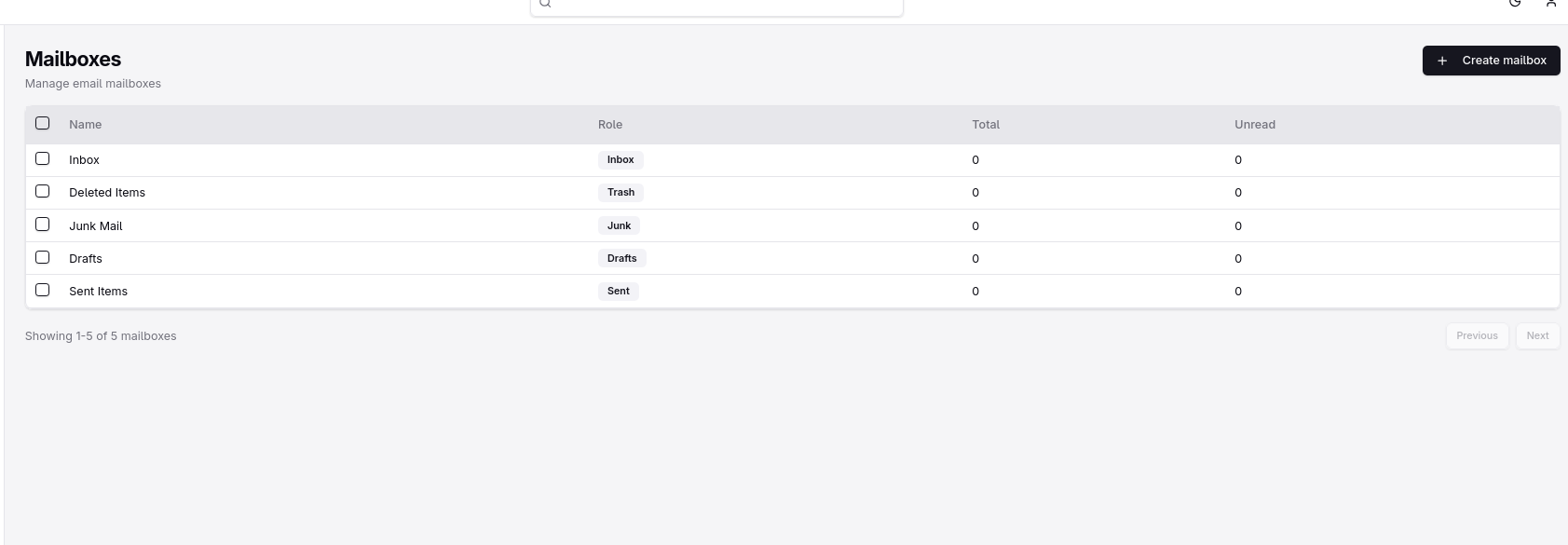
In order to run that command, I seem to need an account id, how can I get that?

With the command you provided I get
```

curl -s -u ‘[email protected]:xxxx’ http://127.0.0.1:8082/jmap -H ‘Content-Type: application/json’ -d ‘{“using”:[“urn:ietf:params:jmap:core”,“urn:ietf:params:jmap:mail”], methodCalls":[[“Email/query”,{“accountId”:“”,“calculateTotal”:true},“q”]]}’

{“type”:“urn:ietf:params:jmap:error:notRequest”,“status”:400,“detail”:“{“using”:[“urn:ietf:params:jmap:core”,“urn:ietf:params:jmap:mail”], methodCalls”:[[“Email/query”,{“accountId”:“”,“calculateTotal”:true},“q”]]}"}
```

From the JMAP session resource object /.well-known/jmap. If not use a JMAP client to check the migrated data is in the target account.

I was unable to get the account id from the above location, but this is a screenshot from the account page for the account in question:

The instance I have running on :8082 was the new one, while the old one was running on :8081 and even though I specified the URL to be at :8082, it seemed it did indeed use the old instance.

Probably the JMAP session resource on the new server is pointing Vandelay to your old instance and that’s why they are being skipped?