Vandelay: Contacts and Calendar folder mapping

Your question

Just completed my first EWS → Stalwart migration test with a 17 year old mailbox.

I posted a small bug report on Github Exporting EWS Import to Stalwart - ContactCard Error · Issue #30 · stalwartlabs/vandelay · GitHub for the contacts issue I experienced.

That aside, when exporting the Calendar and Contacts to Stalwart, they are being uploaded as literal “Calender” and “Contacts” named folders (as they were from Exchange), so I now have two Calendars and two Contacts containers.

Is the only solution to alter the archive to change the folder name to match the existing containers on the account prior to export, or can there be/will there be a mapping override switch or function?

As of now I have
Calendar (email@address) → the pre-created default, empty
Calendar → All my calendar items are here, as that was the EWS name

Contacts (email@address) → the pre-created default, empty
Contacts → All my contacts are here, as that was the EWS name

Guidance is appreciated.

I understand that topics in this category are triaged by a bot first but a human reply will follow up. If I’d prefer a human-only reply, I’ll add the no-ai tag to my topic.

on

When the export reconciles containers it only matches on the name, trimmed and lowercased, so an Exchange “Calendar” doesn’t match the calendar Stalwart pre-creates for a new account and a second one gets created alongside it.

An easy fix is to rename the Stalwart default calendar to exactly Calendar and the default address book to exactly Contacts before you run it. The names then match, the existing containers get reused, and you’ll see them reported as skipped rather than created. Rename them back afterwards if you like. If you’ve already run it, just delete the empty pre-created container and mark the imported one as default in the web UI; nothing needs to be moved.

Calendars and address books are exported flat, so any nested calendar or contact folders in Exchange come across as sibling containers rather than a hierarchy. Only mail folders keep their tree. There’s no mapping or rename option today, only include and exclude filters, and that’s a reasonable thing to ask for.

I tried this again with 1.0.8.

I deleted all Contacts and Calendars. I created brand new “Contacts” and “Calendar”. They were marked as default since they were the only ones. So far so good.

I ran the export. It added a whole bunch of extra Address Books (literally) that used to have names in 1.0.7 like Recipient Cache and GAL, but now those names are lost, and the default Contacts is no longer marked as default.

The only way to get a default back is to delete everything.

This seems to be going backwards a bit.

Two things changed in 1.0.9 and one we still need your help with. Regarding the default container, vandelay now leaves the target account’s default alone if it already has one, so an export can no longer move the default away from the Contacts or Calendar you created, and it only claims a default when the account has none; on top of that an archive can no longer hold more than one default address book or calendar, which it could before if the source reported several. On the container matching, the behaviour is unchanged and as described earlier: names are matched trimmed and lowercased, calendars and address books are exported flat, and there is still no rename or mapping option, which if it is really necessary we could add as a feature request. What we could not reproduce is the part where the names are lost, and nothing in the address book export path changed between 1.0.7 and 1.0.8, so before we guess, what exactly do you see in place of Recipient Cache and GAL, are the address books showing an empty name, a placeholder such as Address Book, or a name that looks like the right one but with mangled characters? Along with that, the export output with -vvv around the AddressBook phase and the output of vandelay inspect <archive> addressbook would tell us straight away whether the names were already lost in the archive or only after the export, since the archive column is filled directly from the Exchange folder display name and the export sends it unchanged. Your Stalwart version would help too.

The extra books were literally called “Address Book”.

The previous exports were done with 1.0.7 and either 0.16.15 or 0.16.16, where naming was preserved. It was around August 1st-August 2nd time frame.

Checking my server logs… that was a great guess. It was either 15 or 16, since I did them a day apart. I would lean towards 0.16.16.

stalwart.2026-08-01:2026-08-01T20:02:00Z INFO Starting Stalwart Server (server.startup) hostname = "mx1.disruptmail.ca", version = "0.16.15"
stalwart.2026-08-02:2026-08-02T21:45:59Z INFO Starting Stalwart Server (server.startup) hostname = "mx1.disruptmail.ca", version = "0.16.16"

The latest export run was done yesterday with 1.0.8 + 0.16.18, that’s where naming was replaced.

I used the exact same sqlite file both times that was previously imported from EWS, so that should remove it as a suspect.

I will run the commands as requested and report back. Thanks.

Edit: I filed the contact card bug in Vandelay on Aug 9th, so it was absolutely 0.16.16, as I upgraded to 0.16.17 on August 10th.

A re-export with 1.0.9 and 0.16.18 shows the problem still exists, both with naming and with the default flag being turned off.

I start clean with no books, and create one brand new one.

I will need to capture the output of -vvv and parse it as it is massive.

Inspection of the archive shows the names are correct, so it seems there is a regression somewhere.

AddressBook (10)

addressbook #1
name           Contacts
description    (null)
sort_order     0
is_default     false
is_subscribed  true

addressbook #2
name           Suggested Contacts
description    (null)
sort_order     0
is_default     false
is_subscribed  true

addressbook #3
name           ExternalContacts
description    (null)
sort_order     0
is_default     false
is_subscribed  true

addressbook #4
name           Recipient Cache
description    (null)
sort_order     0
is_default     false
is_subscribed  true

addressbook #5
name           GAL Contacts
description    (null)
sort_order     0
is_default     false
is_subscribed  true

addressbook #6
name           {06967759-274D-40B2-A3EB-D7F9E73727D7}
description    (null)
sort_order     0
is_default     false
is_subscribed  true

addressbook #7
name           {A9E2BC46-B3A0-4243-B315-60D991004455}
description    (null)
sort_order     0
is_default     false
is_subscribed  true

addressbook #8
name           Companies
description    (null)
sort_order     0
is_default     false
is_subscribed  true

addressbook #9
name           Organizational Contacts
description    (null)
sort_order     0
is_default     false
is_subscribed  true

addressbook #10
name           PeopleCentricConversation Buddies
description    (null)
sort_order     0
is_default     false
is_subscribed  true

Well sir, I captured the -vvv output for you, and I’m very confused, because what Vandelay reports completely disagrees with what Stalwart reports.

I used a brand new import from Exchange with 1.0.9, exported to Stalwart 0.16.18.

Started the Stalwart account clean with a single default “Contacts” book.

export: AddressBook ...
JMAP POST https://mx.example.ca/jmap/ -> 200 (56 ms)
  > {
  >   "methodCalls": [
  >     [
  >       "AddressBook/get",
  >       {
  >         "accountId": "g",
  >         "ids": null
  >       },
  >       "g"
  >     ]
  >   ],
  >   "using": [
  >     "urn:ietf:params:jmap:core",
  >     "urn:ietf:params:jmap:contacts"
  >   ]
  > }
  < {
  <   "methodResponses": [
  <     [
  <       "AddressBook/get",
  <       {
  <         "accountId": "g",
  <         "list": [
  <           {
  <             "description": null,
  <             "id": "cv",
  <             "isDefault": true,
  <             "isSubscribed": false,
  <             "myRights": {
  <               "mayDelete": true,
  <               "mayRead": true,
  <               "mayShare": true,
  <               "mayWrite": true
  <             },
  <             "name": "Contacts",
  <             "sortOrder": 0
  <           }
  <         ],
  <         "notFound": [],
  <         "state": "sr3zag"
  <       },
  <       "g"
  <     ]
  <   ],
  <   "sessionState": "3235b972"
  < }
JMAP POST https://mx.example.ca/jmap/ -> 200 (84 ms)
  > {
  >   "methodCalls": [
  >     [
  >       "AddressBook/set",
  >       {
  >         "accountId": "g",
  >         "create": {
  >           "c10": {
  >             "isSubscribed": true,
  >             "name": "PeopleCentricConversation Buddies",
  >             "sortOrder": 0
  >           },
  >           "c2": {
  >             "isSubscribed": true,
  >             "name": "Suggested Contacts",
  >             "sortOrder": 0
  >           },
  >           "c3": {
  >             "isSubscribed": true,
  >             "name": "ExternalContacts",
  >             "sortOrder": 0
  >           },
  >           "c4": {
  >             "isSubscribed": true,
  >             "name": "Recipient Cache",
  >             "sortOrder": 0
  >           },
  >           "c5": {
  >             "isSubscribed": true,
  >             "name": "GAL Contacts",
  >             "sortOrder": 0
  >           },
  >           "c6": {
  >             "isSubscribed": true,
  >             "name": "{06967759-274D-40B2-A3EB-D7F9E73727D7}",
  >             "sortOrder": 0
  >           },
  >           "c7": {
  >             "isSubscribed": true,
  >             "name": "{A9E2BC46-B3A0-4243-B315-60D991004455}",
  >             "sortOrder": 0
  >           },
  >           "c8": {
  >             "isSubscribed": true,
  >             "name": "Companies",
  >             "sortOrder": 0
  >           },
  >           "c9": {
  >             "isSubscribed": true,
  >             "name": "Organizational Contacts",
  >             "sortOrder": 0
  >           }
  >         }
  >       },
  >       "s"
  >     ]
  >   ],
  >   "using": [
  >     "urn:ietf:params:jmap:core",
  >     "urn:ietf:params:jmap:contacts"
  >   ]
  > }
  < {
  <   "methodResponses": [
  <     [
  <       "AddressBook/set",
  <       {
  <         "accountId": "g",
  <         "created": {
  <           "c10": {
  <             "id": "cw"
  <           },
  <           "c2": {
  <             "id": "cx"
  <           },
  <           "c3": {
  <             "id": "cy"
  <           },
  <           "c4": {
  <             "id": "cz"
  <           },
  <           "c5": {
  <             "id": "c7"
  <           },
  <           "c6": {
  <             "id": "c9"
  <           },
  <           "c7": {
  <             "id": "c2"
  <           },
  <           "c8": {
  <             "id": "c0"
  <           },
  <           "c9": {
  <             "id": "c1"
  <           }
  <         },
  <         "newState": "ssdzag",
  <         "oldState": "sr3zag"
  <       },
  <       "s"
  <     ]
  <   ],
  <   "sessionState": "3235b972"
  < }
export: Calendar ...

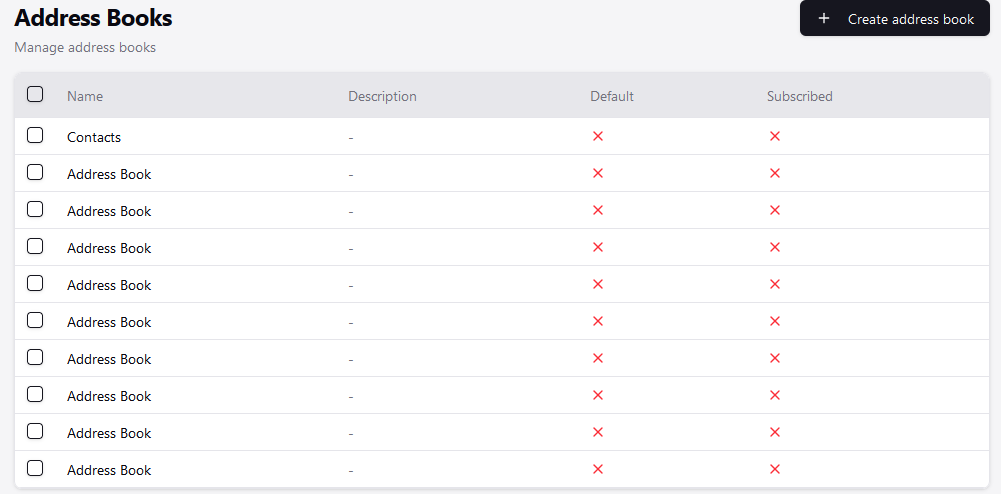
This one was a Stalwart bug, it has been fixed in v0.16.19 (yet to be released). This fix sets the default address book ids on new accounts but for existing ones you’ll have to set it manually or using a script.

Tested again with v0.16.19

Deleted all address books and calendars, started with “Contacts” and “Calendar” as default.

We now have correctly named address books, but the default flag is still being nullified. Almost there!

This happened because the default address book was deleted. v0.16.20 will use the first available address book as the default if the default one is deleted.

Wouldn’t that imply that Vandelay deleted the book then, instead of merging the “Contacts” from the archive with the existing “Contacts” that was the default?

Vandelay does not delete address books or calendars while exporting.

This probably happened when you deleted all address books and calendars.

To be clear, yes I deleted all Calendars and Address Books, but I then create one Calendar called “Calendar” and mark it as default, and one Address Book called “Contacts” and mark it as default, as seen here:

That way the default Calendar and Address Book match the names in the archive, with the expectation that the data would merge - yet after running export, the default flag on the Address Book is removed, Calendar is fine.

Ran with v0.16.20 and default stays marked.

Started with:

Ran Export

Refreshed a couple seconds later:

Should the new books be marked as subscribed if a client hasn’t connected to them yet?

Yes, that one is intended. isSubscribed means the user wants the collection visible in their client, not that a client has already talked to it. RFC 9610 §2 says it SHOULD default to true for address books a user creates in their own account and false only for shared ones they have been granted access to, and the calendars draft carries the same wording. The migration runs as the account owner, so true is what it sets.

Setting it false would leave you with a finished migration and an empty client wherever the flag is honoured. You can untick Subscribed per book in the UI for the ones you do not want to see.

One correction to something I said earlier in this thread: the include and exclude filters I mentioned only exist on the IMAP and Maildir importers, not on the EWS one. So Recipient Cache, GAL Contacts and the GUID books cannot be held back from the run; deleting them in Stalwart afterwards is the answer today.

Wonderful. It was a long road but I think migrating from Exchange is fully functional now.