Your question
I’m trying to setup stalwart behind traefik as my reverse proxy.
I ticked the box at Settings > Network > Services > Http > General > Proxy > Obtain remote IP from Forwarded header.
Afterwards I set the log-level of the tracer to debug. Then pressed Management > Actions > Reload - Server settings but if I take a look into the logs, I’m seeing the ip adress of traefik in remoteIp = within the logs.
Does that mean that X-Forwarded-For doesn’t work?
I understand that topics in this category are triaged by a bot first but a human reply will follow up. If I’d prefer a human-only reply, I’ll add the no-ai tag to my topic.
on
Seeing Traefik’s IP in remoteIp does not necessarily mean X-Forwarded-For is broken – it most likely means Stalwart does not yet have Traefik’s IP listed as a trusted network, so it refuses to honour the header. There are two things to verify:
1. Trusted networks must be configured
Enabling “Obtain remote IP from Forwarded header” (useXForwarded = true) is only half the story. Stalwart will only read X-Forwarded-For from connections that arrive from a trusted proxy address. Without that, it falls back to the socket source address (Traefik’s IP).
Add Traefik’s IP (or the CIDR of your internal network) to Settings > Network > Services > Trusted Networks (proxyTrustedNetworks on the SystemSettings singleton). For example:
172.17.0.0/16 (Docker bridge)10.0.0.0/8- The exact IP address of your Traefik container
This is the same proxyTrustedNetworks list used by Proxy Protocol, but it also governs X-Forwarded-For header trust.
2. Consider using Proxy Protocol instead
For Traefik specifically, the docs actually recommend Proxy Protocol over X-Forwarded-For, because:
- It works at the TCP layer and covers all protocols (SMTP, IMAP, POP3, HTTP), not just HTTP.
- It also forwards the TLS status of the original connection, which matters for SPF/DMARC.
Stalwart has a dedicated Traefik guide with product-specific examples for setting this up.
To answer your direct question: seeing Traefik’s IP means the header is present but not yet trusted, not that it is missing. Configuring proxyTrustedNetworks to include Traefik’s address should resolve it.
Relevant docs:
This is an automated reply from the Stalwart Help Bot. Other community members may follow up if this answer is incomplete or wrong.
Add Traefik’s IP (or the CIDR of your internal network) to Settings > Network > Services > Trusted Networks
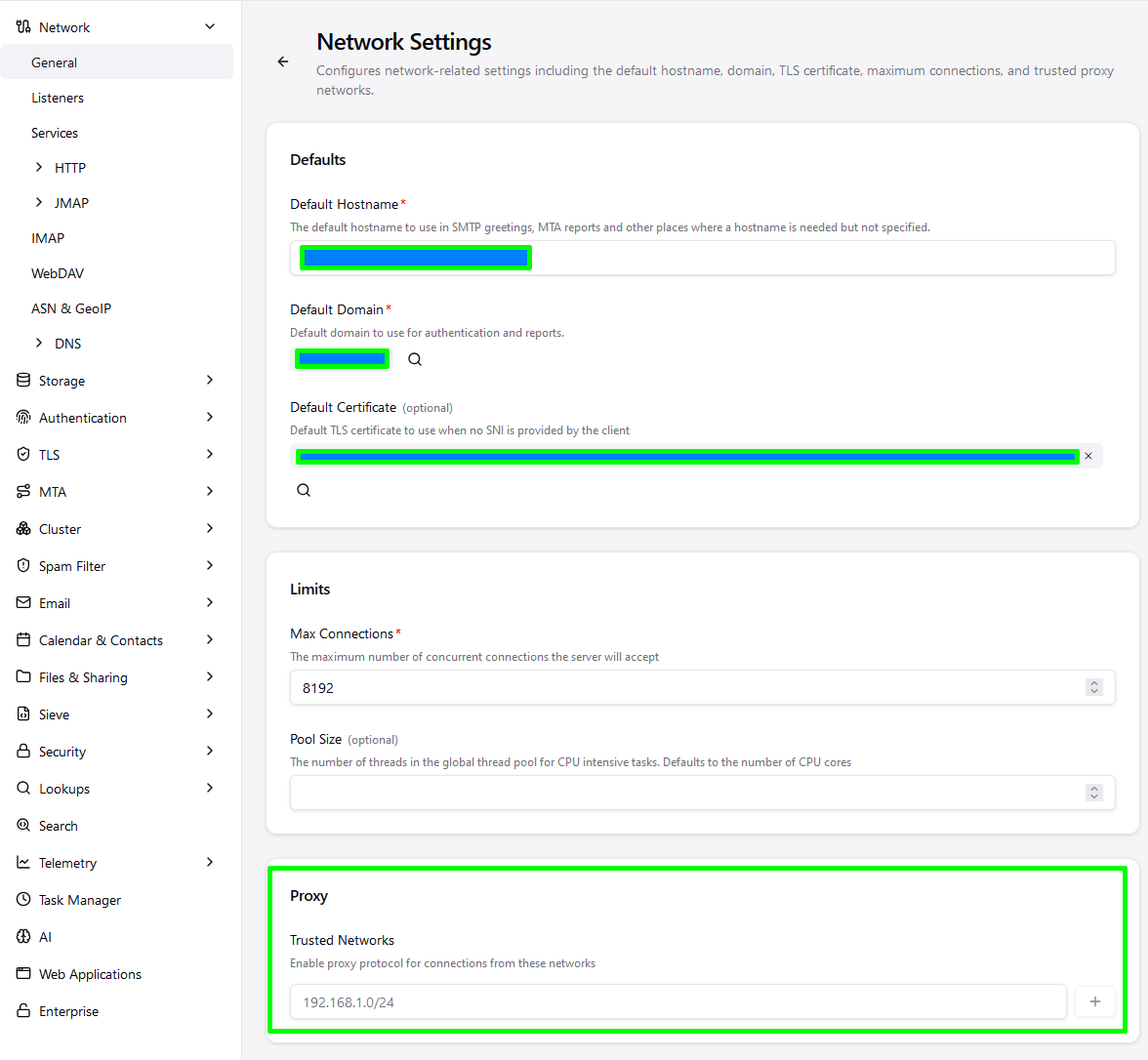
This path does not exist or I’m blind.
If I add the CIRD or the IP address of the gateway of the podman-network in proxyTrustedNetworks, then I’m getting the following error message:
WARN Proxy protocol error (network.proxy-error)
	listenerId = "http"
	localIp = ::
	localPort = 8080
	tls = false
	reason = "invalid proxy header"
and I’m not able to open up the admin panel anymore T.T
The page is titled “Network Settings” but the menu item is actually Network → General. It’s the very first page in Settings, at the bottom of the pane.
if I add the address there, I’m getting this issue and I can’t access the admin UI anymore 
Sorry, reading your post a little closer here.
Putting the IP in the Trusted Networks means Stalwart expects Proxy Protocol to be active. The WARN you posted shows it is not, so yes, your connection will be denied.
You don’t want to mix X-F-F and PP. They do the same job, just differently.
Ideally you want to enable PP in Traefik, keep the Trusted Networks on and disable the X-F-F header setting in Stalwart.
I think the bot mislead you on the first point because you don’t want to put an IP in the Trusted Networks for X-F-F, as that tells Stalwart to expect PP headers.
I don’t know how to enable Proxy Protcol in Traefik, but I’m sure examples are easily found. Edit: Traefik | Stalwart has the configuration. It’s literally just putting ProxyProtocol: in the config.
You don’t want to mix X-F-F and PP. They do the same job, just differently.
If I’m understanding it correctly, XFF (X-Forwarded-For) is only sent for HTTP requests.
Edit: Traefik | Stalwart has the configuration. It’s literally just putting ProxyProtocol: in the config.
That’s only half true because according to the official traefik docs about tcp and http:
If both HTTP routers and TCP routers listen to the same EntryPoint, the TCP routers will apply before the HTTP routers. If no matching route is found for the TCP routers, then the HTTP routers will take over.
And with the problem that you can’t enable the PP protocol for HTTP services, I do have to mix XFF and PP for the http or I’m missunderstanding something here 
hm.. but that’s another subject. I’m wondering if this question could be marked as “answered” since there’s not really a way to really check it manually.
Thank you for the discussion though 
No, I don’t think you’re misunderstanding, but now I have a question, if you put an IP into Trusted Networks, does Stalwart expect to receive Proxy Protocol headers on ALL connections, including HTTP, and it’s an all or nothing scenario?
At the limit of my knowledge so hopefully someone else will chime in.
Disrupt has it right: X-Forwarded-For and Proxy Protocol are mutually exclusive per listener, don’t enable both. The Trusted Networks field is specifically for Proxy Protocol: putting Traefik’s IP there tells Stalwart to expect a PROXY header on that connection, and since Traefik in HTTP mode sends X-Forwarded-For instead, you get “invalid proxy header” and the connection is rejected, which is what locked you out of the admin UI.
Alright, thank you for the clarification. I guess setting XFF or PP per listener is the solution here then. Thanks!