Issue Description
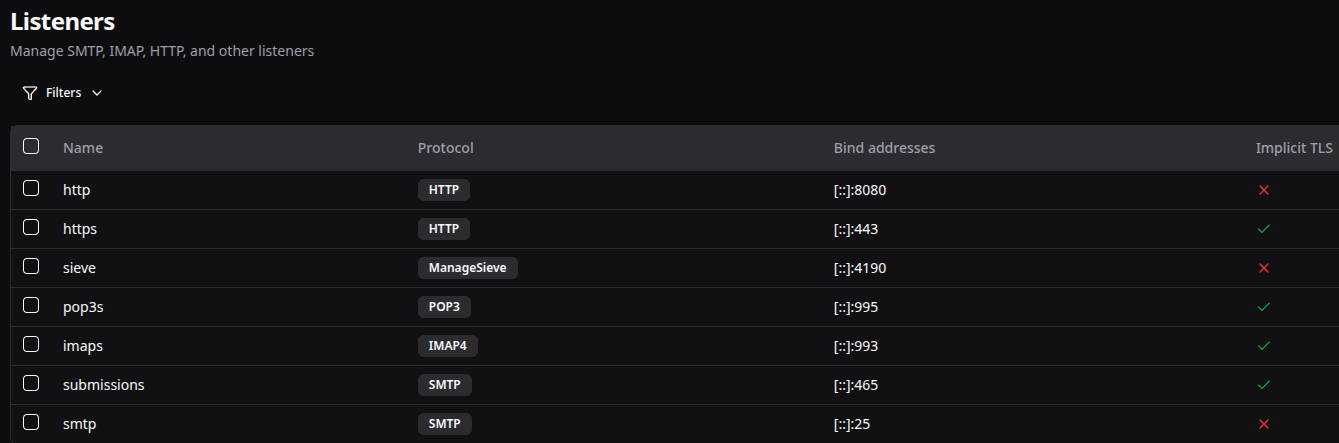
When updating my Stalwart deployment from v0.16.8 to v0.16.9 by replacing the binary (which I have been doing since ~v0.10 - follow major upgrade migration guides when needed), the mail server is now responding incorrectly to HTTP(S) requests. I am unable to reach it via HTTP(S) or SMTP (Thunderbird client is unable to verify certificate, same with my browser).
When trying to observe the logs, I do not see any errors or warnings.
When curling <mail.myaddress.com>/account/login (IPv4 or IPv6)
* Established connection to mail.myaddress.com (XXX::1 port 443) from XXX port 35644
* using HTTP/1.x
> GET /account/login HTTP/1.1
> Host: mail.sayfullaheid.me:443
> User-Agent: curl/8.18.0
> Accept: */*
>
* Request completely sent off
* Received HTTP/0.9 when not allowed
< 2closing connection #0
curl: (1) Received HTTP/0.9 when not allowed
Relevant Log Output
From /opt/stalwart-mail/data/LOG ( I just get this on repeat):
Blob file count: 0, total size: 0.0 GB, garbage size: 0.0 GB, space amp: 0.0

Uptime(secs): 1200.2 total, 600.0 interval
Flush(GB): cumulative 0.000, interval 0.000
AddFile(GB): cumulative 0.000, interval 0.000
AddFile(Total Files): cumulative 0, interval 0
AddFile(L0 Files): cumulative 0, interval 0
AddFile(Keys): cumulative 0, interval 0
Cumulative compaction: 0.00 GB write, 0.00 MB/s write, 0.00 GB read, 0.00 MB/s read, 0.0 seconds
Interval compaction: 0.00 GB write, 0.00 MB/s write, 0.00 GB read, 0.00 MB/s read, 0.0 seconds
Estimated pending compaction bytes: 0
Write Stall (count): cf-l0-file-count-limit-delays-with-ongoing-compaction: 0, cf-l0-file-count-limit-stops-with-ongoing-compaction: 0, l0-file-count-limit-delays: 0, l0-file-count-limit-stops: 0, memtable-limit-delays: 0, memtable-limit-stops: 0, pending-compaction-bytes-delays: 0, pending-compaction-bytes-stops: 0, total-delays: 0, total-stops: 0
Block cache LRUCache@0x5826b4417e40#592 capacity: 32.00 MB seed: 412507367 usage: 3.24 KB table_size: 1024 occupancy: 3 collections: 3 last_copies: 0 last_secs: 3.7e-05 secs_since: 0
Block cache entry stats(count,size,portion): DataBlock(2,2.98 KB,0.00910163%) Misc(1,0.00 KB,0%)

** File Read Latency Histogram By Level [l] **

** Compaction Stats [o] **
Level    Files   Size     Score Read(GB)  Rn(GB) Rnp1(GB) Write(GB) WPreComp(GB) Wnew(GB) Moved(GB) W-Amp Rd(MB/s) Wr(MB/s) Comp(sec) CompMergeCPU(sec) Comp(cnt) Avg(sec) KeyIn KeyDrop Rblob(GB) Wblob(GB)
-------------------------------------------------------------------------------------------------------------------------------------------------------------------------------------------------------------
 Sum      0/0      0.00 KB   0.0      0.0     0.0      0.0       0.0       0.0      0.0       0.0   0.0      0.0      0.0      0.00              0.00         0    0.000       0      0       0.0       0.0
 Int      0/0      0.00 KB   0.0      0.0     0.0      0.0       0.0       0.0      0.0       0.0   0.0      0.0      0.0      0.00              0.00         0    0.000       0      0       0.0       0.0

** Compaction Stats [o] **
Priority    Files   Size     Score Read(GB)  Rn(GB) Rnp1(GB) Write(GB) WPreComp(GB) Wnew(GB) Moved(GB) W-Amp Rd(MB/s) Wr(MB/s) Comp(sec) CompMergeCPU(sec) Comp(cnt) Avg(sec) KeyIn KeyDrop Rblob(GB) Wblob(GB)
----------------------------------------------------------------------------------------------------------------------------------------------------------------------------------------------------------------

Blob file count: 0, total size: 0.0 GB, gar
From systemctl:
stalwart-mail.service - Stalwart Mail Server Server
     Loaded: loaded (/etc/systemd/system/stalwart-mail.service; enabled; preset: enabled)
     Active: active (running) since Wed 2026-06-17 15:53:26 CDT; 23min ago
   Main PID: 592 (stalwart)
      Tasks: 16 (limit: 7021)
     Memory: 158.8M (peak: 189.2M)
        CPU: 1.973s
     CGroup: /system.slice/stalwart-mail.service
             └─592 /opt/stalwart-mail/bin/stalwart --config=/opt/stalwart-mail/etc/config.json

Jun 17 15:53:26 - systemd[1]: Started stalwart-mail.service - Stalwart Mail Server Server.
Stalwart Version
v0.16.x
Installation Method
Binary (Linux)
Database Backend
RocksDB
Blob Storage
RocksDB
Search Engine
Internal
Directory Backend
Internal
Additional Context
Stalwart config.json:
{
  "@type": "RocksDb",
  "path": "/opt/stalwart-mail/data"
}
I have reviewed the documentation and FAQ and confirm that my issue is NOT addressed there.
on
I have searched this support forum (open and closed topics) and confirm this is not a duplicate.
on
I understand that topics in this category are triaged by a bot first but a human reply will follow up. If I’d prefer a human-only reply, I’ll add the no-ai tag to my topic.
on